

Where do I see all clients and their history?
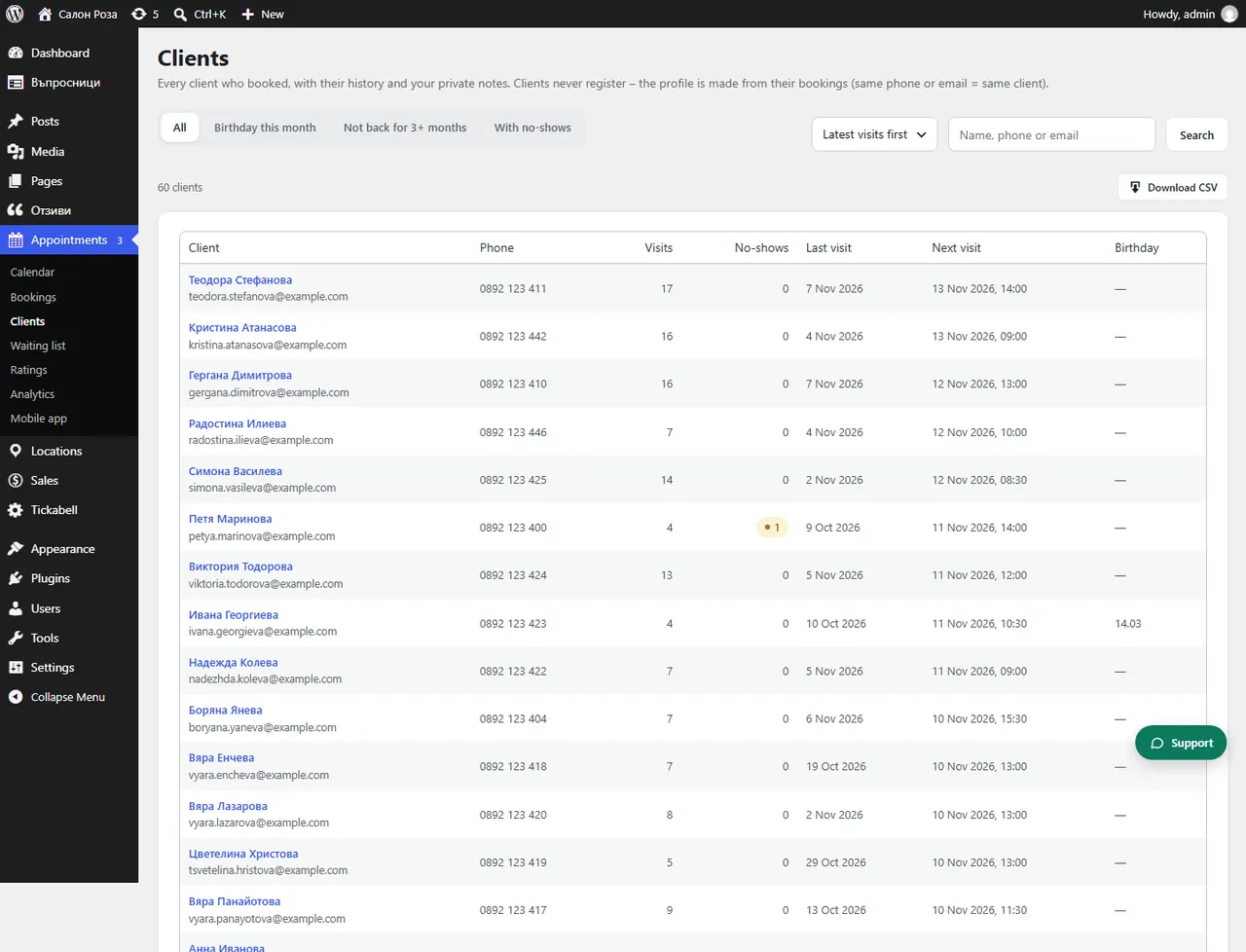
Appointments › Clients lists everyone who has ever booked an appointment. Open a client to see their history, the team's notes and their answers from the form.
Where: Appointments›Clients
What is here
- The list: phone, number of visits, missed appointments, last and next visit, birthday. You search by name, phone or email, and with “Download CSV” you download the list as a spreadsheet.
- The profile: “History” with all the appointments, “Value of the visits”, “Packages and visit cards” and “Answers from the booking form”.
- Notes of the team: formulas, preferences, allergies, what was done last time. Only your team sees them. You add one with “Add note”.
- Contacts: name, phone, email, birthday and consent to greetings and offers. You change them and press “Save”.
Good to knowClients never register. The profile is created by itself from the bookings: the same phone or email means the same client. If one person has booked with different details, Tickabell shows “Same person twice?” and you can merge the profiles.
Related articles
- How do I find the clients with a birthday this month?
- How do I find the clients who have not been back for 3 months?
- How do I see the clients with missed appointments?
Was this article helpful?