

How do I set up N-18?
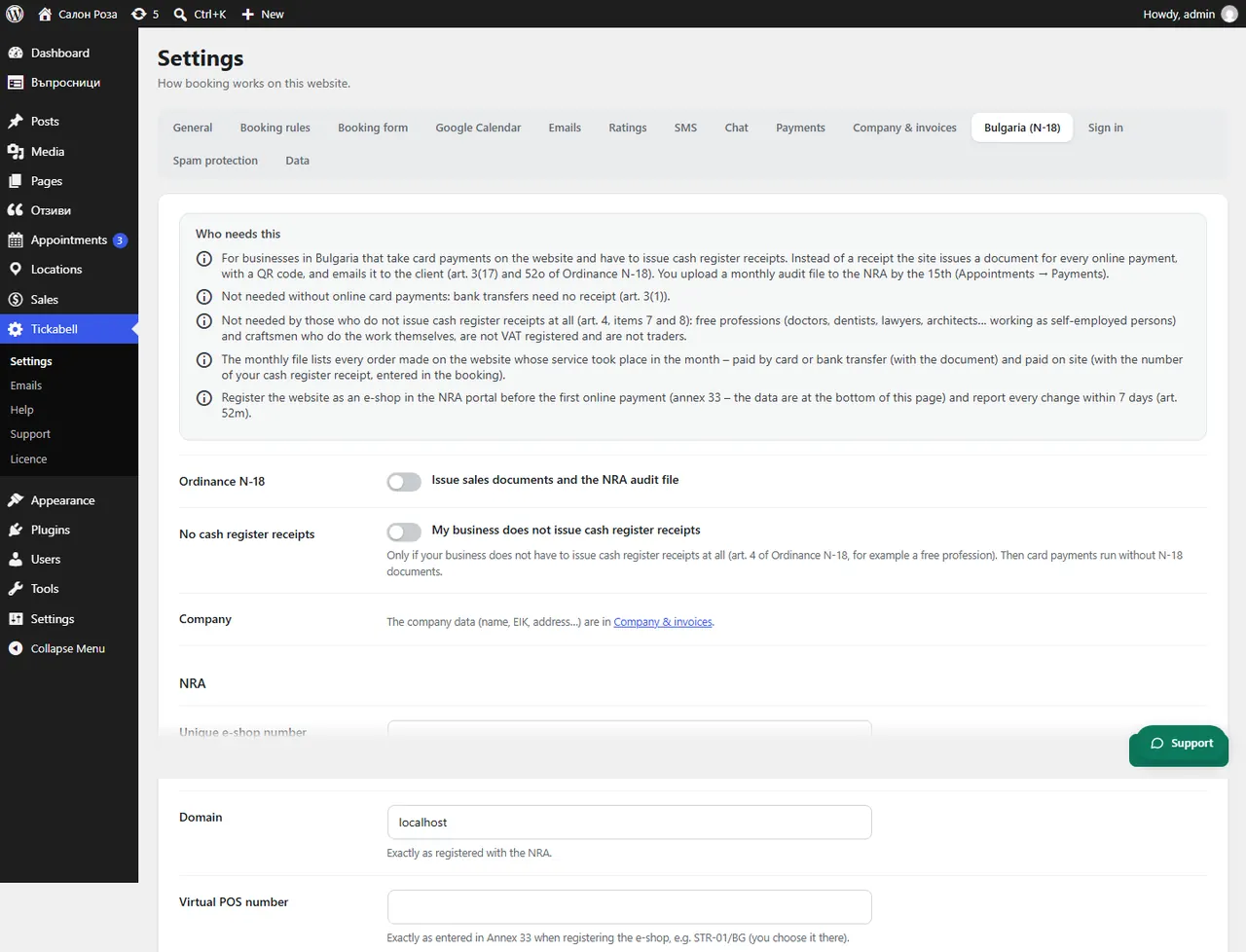
Register the website as an online shop in the NRA portal, then in Tickabell › Settings › Bulgaria (N-18) tick “Issue sales documents and the NRA audit file” and fill in the details from the registration.
Where: Tickabell›Settings›Bulgaria (N-18)
Steps
- In the NRA e-services portal, with a qualified electronic signature, file the information of a person under Art. 3 of Ordinance N-18 who sells goods or services through an online shop.
- Open Tickabell › Settings › Bulgaria (N-18) and tick “Issue sales documents and the NRA audit file”.
- Fill in “Unique e-shop number” (RF…), “Domain” and “Virtual POS number” exactly as they are at the NRA.
- If you take payments with Stripe, fill in “Merchant ID at Stripe” (acct_…).
- If you carry on an earlier numbering, enter the “Next document number”.
- Save. The company details are filled in under Company & invoices.
Good to knowUntil these details are filled in, card payments through the website are stopped. That way there is no payment without a sales document.
Related articles
- Do I need Ordinance N-18, and what does Tickabell issue?
- How do I download the monthly audit file for the NRA?
- How do I enter the company details?
Was this article helpful?