

How do I take payments online?
Switch on “Take card payments online” in Tickabell › Settings › Payments and choose Stripe or BORICA. Then in each service you decide whether a deposit, the full price or nothing is paid.
Where: Tickabell›Settings›Payments
Steps
- Open Tickabell › Settings › Payments.
- Tick “Take card payments online”.
- In “Card payments through” choose Stripe or BORICA and fill in the details.
- In the services you want paid, choose the type in “Payment when booking”.
- Make a test payment, and only then switch to real payments.
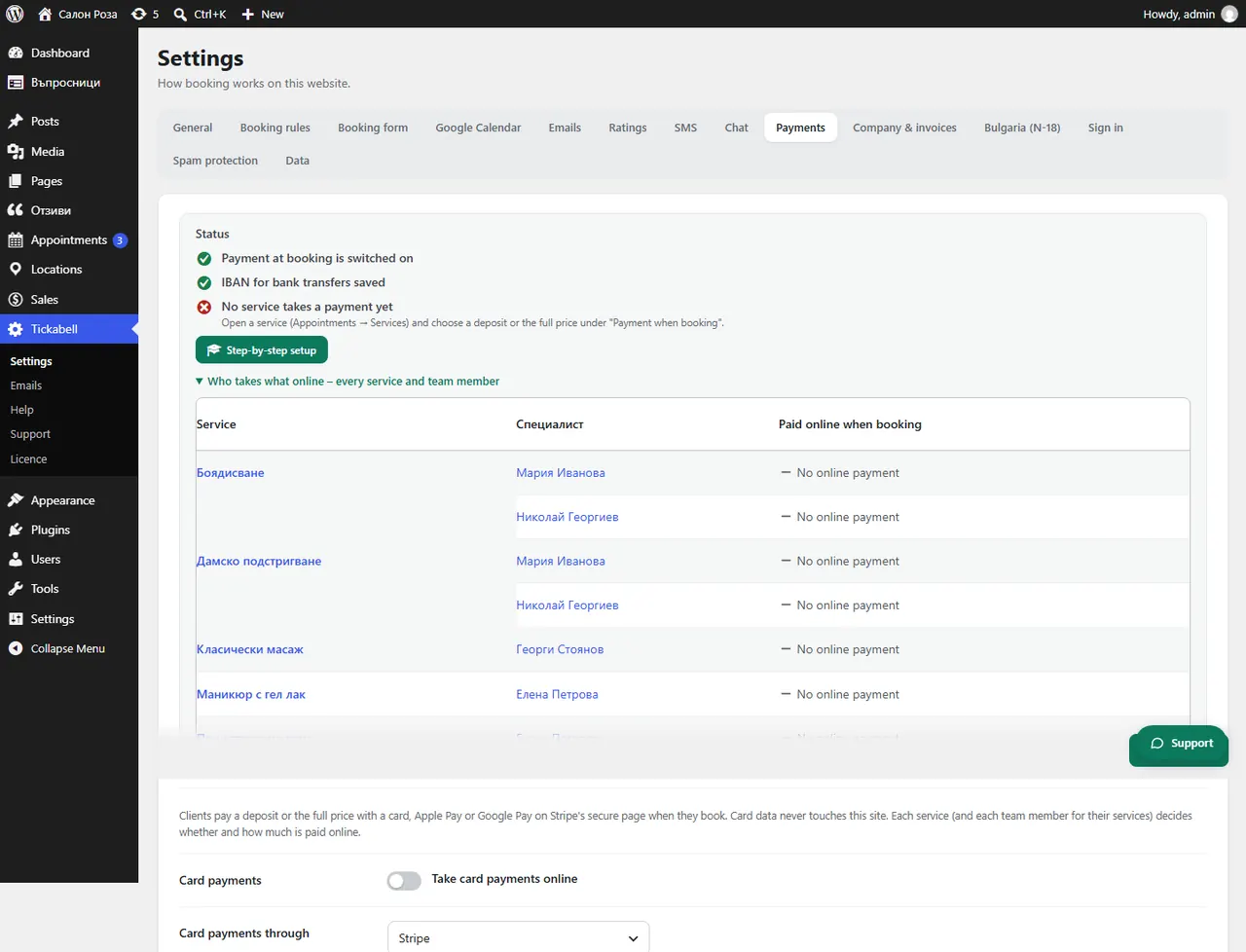
Good to knowThe easiest way is “Step-by-step setup” in the same tab. If you take card payments through the website, also read the article about Ordinance N-18 and ask your accountant what applies to your business.
Related articles
- How do I connect Stripe?
- How do I connect BORICA?
- How do I ask for payment when booking for one service only?
- Do I need Ordinance N-18, and what does Tickabell issue?
Was this article helpful?