

How do I make a package of services?
A package is several visits for one price, for example 10 laser treatments. You create it in Sales › Marketing › Packages. The client pays for the package once and books each visit with a code.
Where: Sales›Marketing›Packages
Steps
- Open Sales › Marketing › Packages.
- In “New package” enter the “Name”, tick the services and set the “Number of visits” and the “Price of the package”.
- In “Valid for (months)” set how long it lasts. 0 means no end date.
- If you like, tick the team members. Nothing ticked means everyone who offers the services.
- Tick “Sell online in the booking form” if you want it to be bought online.
- Press “Create package”.
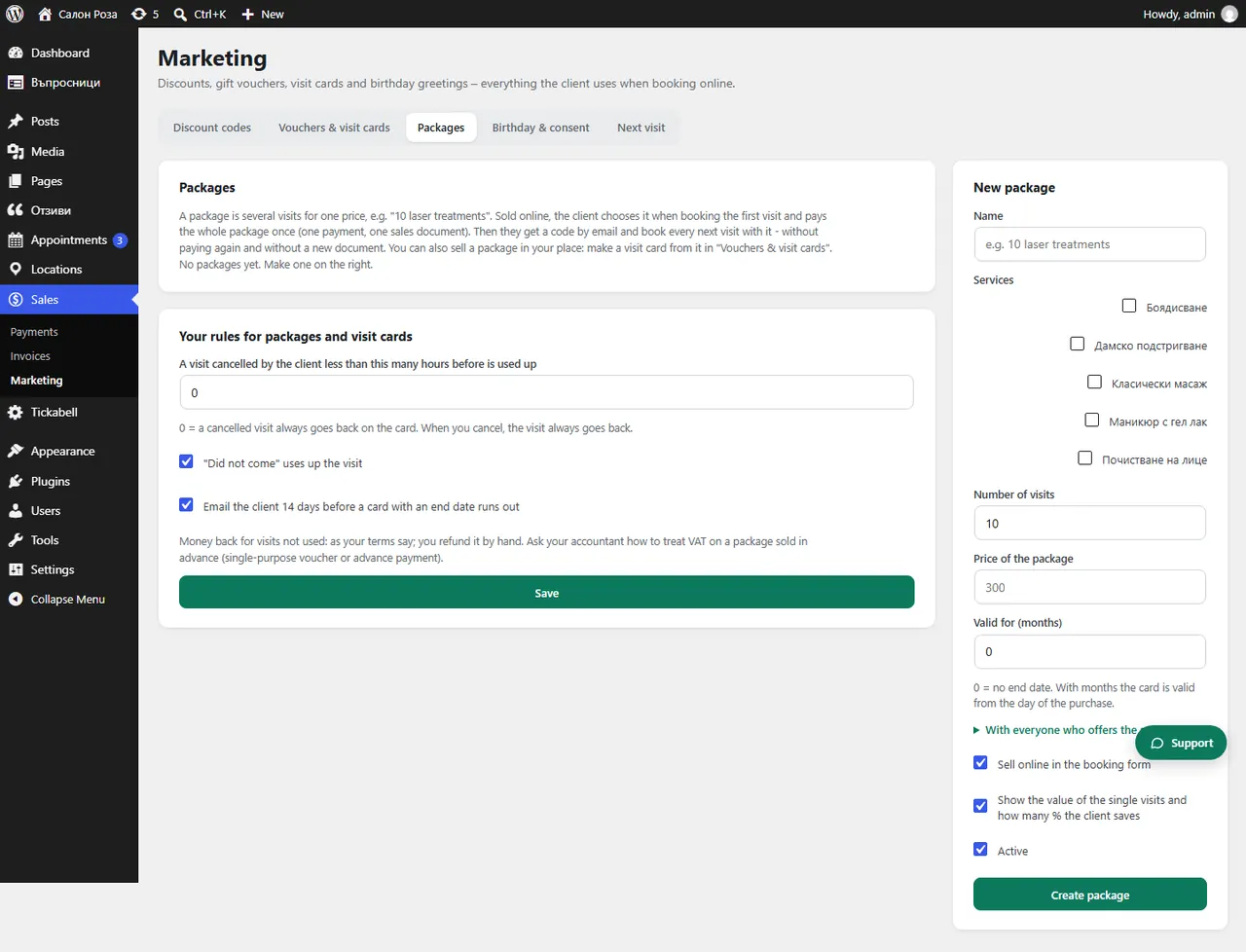
Good to knowAn online package is paid at once: one payment and one sales document. In “Your rules for packages and visit cards” you set when a cancelled visit is taken off. Ask your accountant how VAT works for a package sold in advance.
Related articles
- How do I make a visit card?
- How do I use a package or a voucher when booking?
- How do I take payments online?
Was this article helpful?