

How to read the calendar: day, week, month, by team member
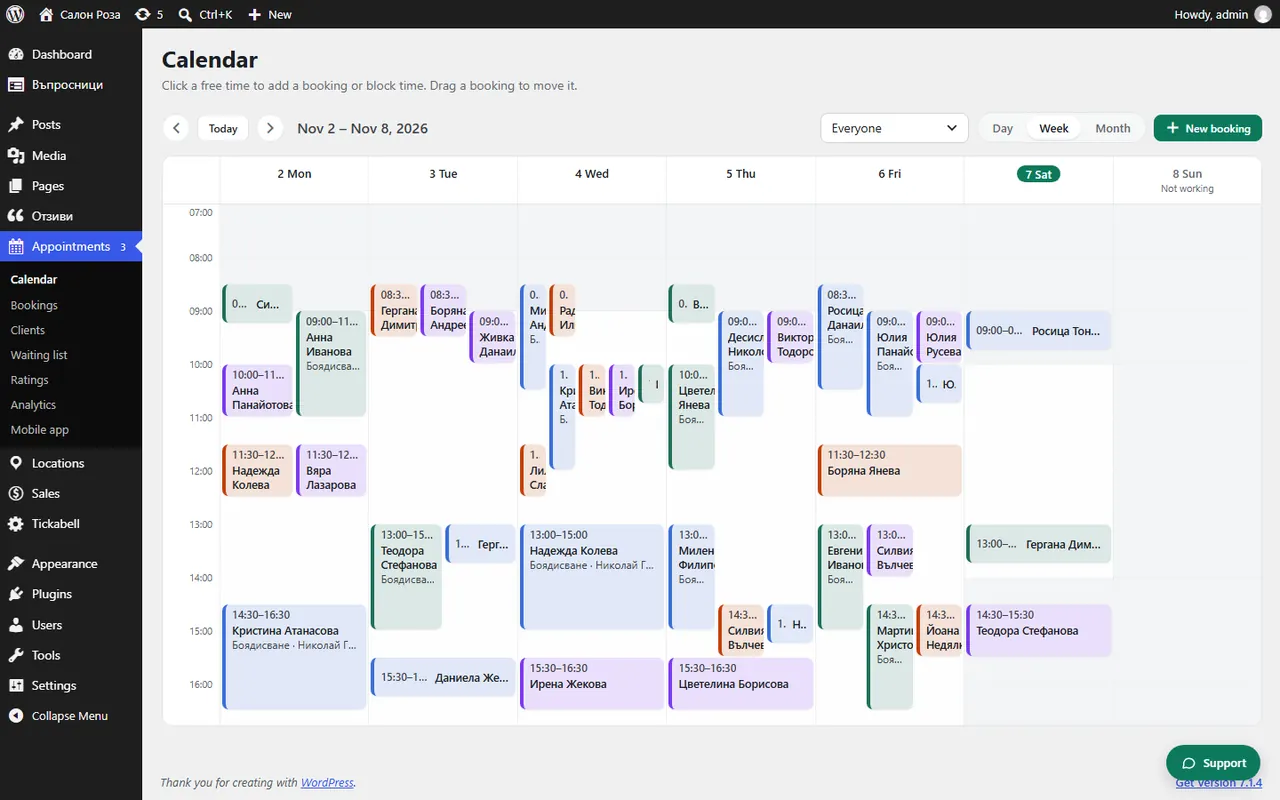
The calendar shows the appointments of the whole team. At the top you choose “Day”, “Week” or “Month”, and with “Previous”, “Next” and “Today” you move through time.
Where: Appointments›Calendar
What is here
- Day, Week, Month: how much time you see at once.
- Previous, Next, Today: to the previous or next period and back to today.
- Everyone: the whole team; choose a person to see only their appointments.
- The colours: confirmed appointments, the ones waiting for confirmation or payment, and blocked time each have their own colour.
Good to knowTeam members see their own appointments. The owner and the managers see everyone's.
Related articles
- How do I book an appointment from the calendar?
- How do I block time?
- How do I move an appointment by dragging it?
Was this article helpful?